

YesPlay has become a familiar name in the South African betting market, offering everything from sports betting and Lucky Numbers to Aviator and a large selection of online games. If you already have an account, getting back into YesPlay is quick, whether you’re visiting from your phone or computer.
The standard YesPlay login uses the cellphone number and password linked to your account. There are also alternative ways to sign in using Google, Facebook or Apple, which can make accessing your account even quicker.
In this guide, we’ll show you how to complete a YesPlay login, access your My Account area, reset a forgotten password and sort out some of the most common login problems. If you’re completely new to the site, have a look at our full YesPlay review first for more information on the games, sportsbook, banking, bonuses and overall experience.
YesPlay Login to My Account
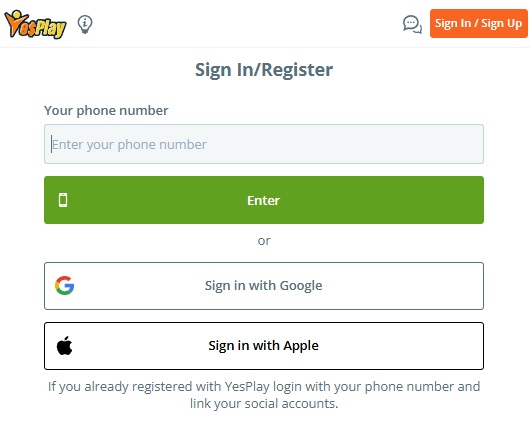
If you’ve already registered with YesPlay, accessing your account should only take a few seconds.
Here’s how to login:
- Visit the official YesPlay website at www.yesplay.bet.
- Tap the orange Sign In / Sign Up button at the top of the page.
- Enter the cellphone number associated with your YesPlay account.
- Tap Enter.
- Enter your YesPlay password.
- Tap Sign In to access your account.
Once you’ve successfully logged in, you’ll be able to see your account balance and access the sportsbook, games, promotions, banking options and other account features. If you’re using your own phone or computer, you can also select Remember Me to make future YesPlay logins quicker. We wouldn’t recommend using this option on a shared or public device.

Different Ways to Login to YesPlay
One thing we like about the YesPlay login is that you’re not limited to just one method. For most South African players, the easiest option will be using the cellphone number and password associated with the account. Enter your registered number, continue to the password screen and you’re good to go.
YesPlay also provides options to sign in through Google, Facebook or Apple. If you originally created your YesPlay account using one of these services, it’s generally best to continue using the same method. This is particularly worth remembering if you’re entering a cellphone number and password but YesPlay doesn’t seem to recognise your account.
Don’t immediately assume something is wrong with the account. You may simply be trying to access it differently from the way you originally registered.
YesPlay Login on Mobile
Most South African players are likely to access YesPlay from their phones, and there’s no separate mobile login process to worry about.
Open YesPlay in Chrome, Safari or your preferred mobile browser, tap Sign In / Sign Up and enter your normal account details. The same YesPlay account works across compatible mobile and desktop devices, so there’s no need to register again when switching phones or computers.
Once you’re logged in, you’ll have access to your balance, betting sections, games and account management features through the mobile interface.
You can also add the YesPlay website to your phone’s home screen if you visit regularly. This creates a convenient shortcut and means you don’t have to search for the website every time you want to login.
YesPlay My Account
Once you’ve completed your YesPlay login, the My Account area is where you’ll manage most of the important parts of your profile.
This includes your personal and account information, transaction history, banking options and other account settings available through the platform. It’s also where you’ll deal with many of the verification requirements associated with your account.
We recommend spending a little time going through your account after registering rather than waiting until you want to make your first withdrawal.
Make sure your personal information is correct and that the cellphone number attached to the account remains active. Having everything properly set up early can save you unnecessary hassles later.

Can’t Login to Your YesPlay Account?
If your YesPlay login isn’t working, don’t immediately create another account. Most login problems have a fairly simple explanation.
Start by checking the cellphone number you’ve entered. It needs to be the same number associated with your registered YesPlay account.
Next, check your password carefully. Passwords are case-sensitive, so an accidental capital letter can be enough to stop the login from working. If your browser has automatically filled in a saved password, try entering it manually instead.
It’s also worth remembering how you originally registered. If you created your account through Google, Facebook or Apple, try that login option rather than repeatedly attempting a cellphone number and password combination.
If you’re certain the details are correct but still can’t get in, use the password recovery option.
How to Reset Your YesPlay Password
Forgotten passwords happen, and YesPlay provides a recovery process directly through the login area.
Open the YesPlay login form and select Forgot Password. Enter the cellphone number associated with your account and follow the verification process.
YesPlay will send a verification code to the registered number. Enter the code when prompted and you’ll then be able to create and confirm a new password.
Choose a password that you don’t already use for another betting site or online account. Once the reset has been completed, return to the YesPlay login and test the new password.
If you no longer have access to the cellphone number connected to your YesPlay account, contact customer support rather than trying to open another account.

YesPlay OTP Not Arriving
Sometimes YesPlay may need to send an SMS verification code to confirm that it’s really you trying to access or recover an account.
If your OTP doesn’t arrive immediately, give it a few minutes. Mobile networks aren’t always instant, and requesting several codes in quick succession can actually make things more confusing because only the latest verification code may work.
Check that your phone has reception and that you’re still using the cellphone number registered with YesPlay. It’s also worth checking whether your phone has filtered the message as spam or from an unknown sender.
If there’s a Resend option, use it and wait for the replacement code. If you still don’t receive anything, contact YesPlay support so they can check what’s happening with your account.
YesPlay Login Page Not Working
Sometimes the problem isn’t your password or account at all. If the YesPlay login page won’t load, keeps refreshing or appears stuck, start by refreshing the website. Closing the browser completely and reopening it can also help.
You can try clearing your browser cache or opening YesPlay through a different browser. On mobile, switching between Wi-Fi and mobile data is another easy way to determine whether you’re experiencing a connection problem.
We’d also recommend accessing YesPlay directly rather than following random login links received through social media, WhatsApp or SMS. You’re entering personal account information, so always make sure you’re using the legitimate YesPlay website.
Google, Facebook or Apple Login Not Working
If you normally access YesPlay through Google, Facebook or Apple, the problem may actually be with that account rather than YesPlay itself.
Make sure you’re signed into the correct Google, Facebook or Apple account on your device. This is especially important if you have several Google accounts logged into the same browser.
Browser privacy settings or blocked pop-ups can also interfere with third-party authentication. If you’ve previously set up cellphone number access on your YesPlay account, you can try that instead. Otherwise, contact customer support for assistance rather than opening a duplicate account.
Don’t Have a YesPlay Account? How to Register
If you’ve landed on our YesPlay login guide but haven’t actually opened an account yet, you’ll need to register before you can access the My Account area.
Visit YesPlay and tap the Sign In / Sign Up button. Choose the registration option and complete the requested information using your real personal details.
Your information will eventually need to match the documentation used for account verification, so don’t use fake information or someone else’s details just to get through the registration form.
Once registration and the required verification steps have been completed, you’ll be able to return to YesPlay and login whenever you want using your chosen account access method.
What Can You Do After Logging Into YesPlay?
Once you’re inside your account, you’ll have access to considerably more than just the homepage. YesPlay offers sports betting across local and international competitions, alongside live betting markets for events already underway. There’s also Lucky Numbers, Aviator and a large collection of online games.
Your logged-in account also gives you access to deposits, withdrawals, promotions and your account information. For us, this is another reason to get your verification completed early. You don’t want to discover that something is missing from your account only when you’ve already requested a withdrawal.
Is the YesPlay Login Secure?
YesPlay is operated by SA Sportsbook (Pty) Ltd and licensed by the Western Cape Gambling and Racing Board under licence number 10180204-010.
The website uses encrypted connections and account verification measures designed to protect customer information. Additional verification may also be requested when accessing or making changes to an account.
You still need to do your part. Use a unique password, don’t share your login information with anyone and always log out when using a shared device. If you notice activity on your account that you don’t recognise, change your password and contact YesPlay support.
YesPlay Customer Support for Login Problems
If you’ve tried resetting your password and working through the troubleshooting steps above but still can’t access your YesPlay My Account area, it’s time to contact support.
YesPlay provides live chat through its website, which is generally the quickest way to get assistance with an account problem. You can also contact the support team at info@yesplay.bet.
When contacting support, provide enough information for them to identify your account, but never send anyone your actual password.
Best Sports Betting’s Thoughts on the YesPlay Login
YesPlay keeps the login process fairly simple, which is exactly what we want from a betting site. For most players it’s a case of opening the website, tapping Sign In / Sign Up and entering the cellphone number and password associated with the account.
Having Google, Facebook and Apple available as additional login methods is a nice touch too. Just remember which option you used when you originally created your account. If you signed up through Google, for example, trying random cellphone number and password combinations isn’t necessarily going to get you back in.
If you do run into trouble, start with the basics. Check your number, re-enter your password, use the password reset if necessary and make sure any verification code is being sent to the correct phone. Most importantly, don’t create another account simply because you’ve temporarily lost access to the first one.
For more help, head back to Best Sports Betting where you’ll find our latest South African betting sites reviews, registration guides, login help, bonuses and promo codes.
Frequently Asked Questions
How do I login to my YesPlay account?
Visit the YesPlay website, tap Sign In / Sign Up and enter the cellphone number associated with your account. Continue with your password and tap Sign In.
How do I access YesPlay My Account?
First complete the normal YesPlay login. Once you’re signed in, you’ll be able to access your account information, balance, transactions, banking and other available account settings.
Can I login to YesPlay on my phone?
Yes. You can access YesPlay through a compatible mobile browser and use the same account that you use on desktop.
Why can’t I login to YesPlay?
Check that you’re using the correct registered cellphone number and password. If you originally registered through Google, Facebook or Apple, try using the corresponding login method instead.
How do I reset my YesPlay password?
Select Forgot Password from the YesPlay login area and enter your registered cellphone number. Complete the SMS verification process and create a new password.
Why isn’t my YesPlay OTP arriving?
Give the SMS a few minutes to arrive, check that your phone has reception and make sure the registered number is still active. Use the resend option if available and contact YesPlay support if the problem continues.
Can I login to YesPlay with Google?
Yes. Google is one of the alternative login options supported by YesPlay, alongside cellphone number access and other supported social sign-in methods.
What if I’ve changed my cellphone number?
Contact YesPlay customer support so they can help update or recover your account. Don’t create another YesPlay account because you no longer have access to the original number.
Do I need an app for the YesPlay login?
No. You can access and login to YesPlay directly through the website using your phone or computer.
Is YesPlay licensed in South Africa?
Yes. YesPlay is operated by SA Sportsbook (Pty) Ltd and licensed by the Western Cape Gambling and Racing Board under licence number 10180204-010.